
Craftsman: Building Craft
StarGame12Simulation
3.518.91K Reviews
- Version
- 1.91
- Installs
- 100.00M
- Age Rating
- Everyone 10+
Screenshots
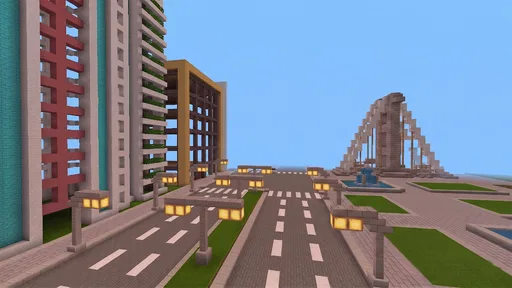
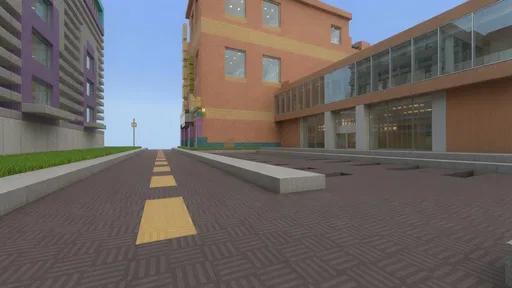
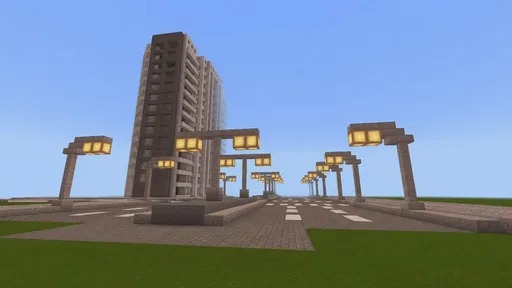
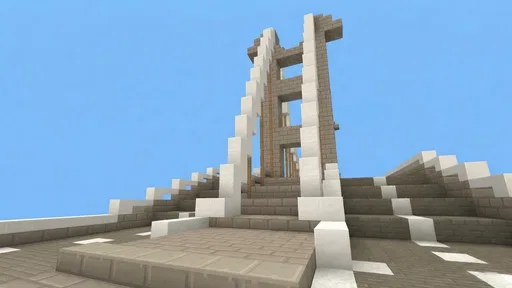
Our Review of Craftsman: Building Craft
 Analysis by Appyee
I judge a block-building game less by how grand its worlds look than by how quickly I can get from an idea to a first useful shape. With Craftsman: Building Craft, the appeal is immediate: familiar blocks, a straightforward start, and room to turn an empty space into a home or a much bigger project. It is a free simulation game from StarGame12, rated Everyone 10+, and its broad reach—over 100 million installs—suggests that plenty of players are curious about this style of building. My main question is whether it suits the way you want to spend your time: calmly designing, or gathering materials and handling the risks of survival.
How quickly you can get to building
The game has a low-friction starting point. The controls are approachable, and creative mode lets me begin shaping an idea without first collecting supplies. That makes it a handy choice for short sessions: I can sketch out a small cabin, test a roofline, or simply place blocks until a design starts to take shape. It is not the same as a dedicated architecture tool, but it offers a more playful way to experiment with space and scale.
For a new player, I’d start with a compact build rather than a sprawling castle. A small structure makes it easier to get comfortable with placing materials and judging proportions before committing to a larger project. I also find it useful to decide on one defining detail first—a courtyard, a tall entrance, or a simple color pattern—then build around it. That keeps creative mode from becoming an aimless pile of blocks.
When a project gets demanding
Large builds naturally ask more of your attention than a quick hut. A castle, for instance, can involve repeating walls, towers, and decorative choices; survival mode adds the separate work of gathering materials and keeping a safe place available. The trade-off is clear: creative mode is better when I want to focus on design, while survival mode gives each building decision a practical purpose. If I only have a few minutes, creative mode is the easier fit; if I want a longer session with more pressure, survival gives me a reason to keep moving.
One useful way to manage a big idea is to work in visible stages: outline the footprint, establish the main height, and then add details. This is not a special in-game feature, just a practical building habit, but it helps prevent a project from feeling overwhelming. It also makes it easier to pause and return later without losing sight of what the structure is meant to be.
Reliability and the limits of a smooth session
The earlier impression of smooth play is encouraging, but I wouldn’t treat it as a promise that every device or long session will behave identically. The game’s current version is 1.91, and it supports devices running Android 6.0 or later. For the best chance of a comfortable session, I’d close other demanding apps before starting a large build and make sure the device has enough free space to run normally. Those are sensible precautions for a block-based game, especially when I plan to spend a while adding detail.
There is also a difference between a game feeling simple and every part of it being friction-free. A large construction can take patience, and survival mode asks me to split attention between making progress and staying prepared. If a session feels busy, I can switch back to a smaller creative project rather than forcing myself through a long build. That flexibility is one of the game’s practical strengths.
Who will enjoy this particular building game
I’d recommend it to players who like making a place their own and don’t need a guided campaign to enjoy a game. It can suit someone unwinding after school or work, a younger player who enjoys arranging shapes and materials, or a friend group looking for inspiration from one another’s worlds. The average rating is 3.5 from around 3.7 million ratings, with about 19,000 written reviews, so the response is mixed enough to set a sensible expectation: its simple, familiar approach will appeal to some players more than others.
On the other hand, I would skip it if I wanted a tightly directed story, a complex construction simulator with precise architectural tools, or a game whose main draw is a polished competitive challenge. It is better understood as an open-ended block playground with a survival option than as a specialist design package. If intricate planning is the point, a dedicated building or design app may be a better match; if I want a light game where experimentation matters more than exact measurements, this is closer to what I’m after.
Getting Started with Craftsman: Building Craft
Once you open Craftsman: Building Craft, you're greeted with a user-friendly interface that’s reminiscent of some classic block-building games we all know. It’s like stepping into a world where you're the master of your own universe. The controls are pretty intuitive, which means you won’t be fumbling around trying to figure out how to start building your dream structures.
The game offers both a creative mode and a survival mode. I started with the creative mode because, let's face it, I wanted to dive right into building without any distractions. Here, you have unlimited resources and can let your imagination run wild. Whether you want to recreate famous landmarks or design your fantasy home, the possibilities are endless.
The Thrill of Building
In creative mode, I found myself lost in hours of constructing castles, skyscrapers, and even a cozy little cottage. The game provides a variety of blocks and materials, so each creation can be as unique as you want it to be. Customization is a big deal here, and I loved being able to tweak every little detail of my projects.
Switching over to survival mode was a different experience altogether. Here, I had to gather materials, fend off creatures, and ensure I had a safe place to retreat when night fell. It added a layer of excitement and urgency that kept me on my toes. Building structures in this mode has its own charm because you not only create but also defend your creations.
Graphics and Sound
The graphics are charmingly blocky, which might remind you of some other popular crafting games. But there's something uniquely appealing about the simplicity of Craftsman: Building Craft. The visual style is easy on the eyes, and the colors are vivid and engaging. As for the sound, it’s pretty minimalistic, which I found to be a good thing. The lack of overwhelming background noise lets you focus on the task at hand.
Building Community
One of the coolest features is the ability to share your worlds with friends. I found myself spending a good chunk of time exploring worlds created by other players. It’s inspiring to see what others have come up with, and it sparks new ideas for your own projects. Plus, there’s something really satisfying about showing off your hard work to others who appreciate the craft.
Performance and Accessibility
Performance-wise, the app runs smoothly on both Android and iOS devices. I didn’t experience any lag or crashes, which is always a plus in my book. The app is free to download, with some in-app purchases available if you want to enhance your building experience further. But honestly, even without spending a dime, there’s plenty to enjoy.
One thing I appreciated was the accessibility. You don’t need to be a pro gamer to enjoy this app. Whether you’re a seasoned builder or just looking to kill some time with a relaxing activity, this game has something for everyone.
What to expect from the free version
The game costs nothing to start, while optional in-app purchases are listed at $0.99 per item. I’d begin without buying anything and first see whether the building loop holds my attention. In a game centered on making things, it is worth deciding what I actually want from a purchase before spending: a paid item should feel useful to my own play, not simply tempting because I’m already invested in a project. The free entry point makes that trial-and-decide approach easy.
A realistic session might be a quick break in the afternoon: I open creative mode, map out the footprint of a house, and place the walls before setting the phone down. Later, I can return with a clearer idea of the roof or interior. If I have more time, I might try survival instead, where collecting what I need changes the pace. That distinction is a helpful answer to a common choice: there is a way to build without resource pressure, and a different way to make preparation part of the fun.
Small habits that make building more satisfying
When I’m planning a larger structure, I try to make one readable section at a time rather than decorating every wall as I go. Getting the overall silhouette right first gives me room to revise proportions before details make changes feel tedious. I also use a small build as a materials and control warm-up before attempting something ambitious. Those habits matter because the game offers freedom, but freedom can make it easy to lose a clear direction.
For survival, I’d treat a safe retreat as part of the build plan, not an afterthought. Since gathering materials and defending a place both compete for attention, a modest shelter gives the session a practical starting point. Once that is handled, I can expand at a pace that feels manageable. This is a different kind of satisfaction from creative mode: the structure earns its place by helping me keep going, rather than serving only as a design exercise.
Choosing between this and other block games
Compared with the usual alternatives in block-building, this game’s strongest case is its approachable mix of free construction and survival play. A more focused sandbox may be a better choice if I want deeper tools, a stronger progression structure, or a highly polished ecosystem; a design app is more suitable when exact dimensions and practical plans matter. Here, I’m choosing a casual, game-like space to try ideas, not a professional drafting workflow. That difference helps set expectations before downloading.
It also suits people who enjoy visual experimentation more than instruction. There is no need to arrive with a complete blueprint: a rough notion of a castle, home, or hideout is enough to begin. But if I tend to lose interest without objectives telling me what to do next, the open-ended nature may feel too loose. The survival option adds urgency, yet it does not turn the experience into a guided building course.
Final Thoughts
All in all, Craftsman: Building Craft is a delightful app that offers both endless creativity and engaging gameplay. It’s perfect for anyone who enjoys building games and wants to explore a world of their own making. Whether you’re in it for the creative aspect or the survival challenge, there’s no shortage of fun to be had. So grab your virtual tools and start crafting your masterpiece today!
Ready to give it a try? You can download Craftsman: Building Craft from the App Store or Google Play and get started on your building adventure. Trust me, once you start, it'll be hard to put down.
Verdict
Strengths of Craftsman: Building Craft
- Intuitive building controls for easy gameplay.
- Vast open-world environment to explore.
- Variety of materials for creative construction.
- Offline mode available for uninterrupted play.
- Regular updates with new features and content.
Limitations of Craftsman: Building Craft
- Graphics are not as polished as competitors.
- Limited character customization options.
- Some in-game items require real money.
- Occasional lag on lower-end devices.
- Multiplayer mode lacks robust features.
Similar Picks in This Category
View All
Truckers of Europe 3
Wanda Software4.3

Town Building Life Simulator
XGame Global4.2

Fidget Toys Trading・Pop It 3D
Freeplay Inc4.7

Sculpt People
CrazyLabs LTD4.4

Scary Teacher 3D
Z & K Games4.2

Hair Tattoo: Barber Shop Game
CASUAL AZUR GAMES4.3
Frequently Asked Questions
What is Craftsman: Building Craft?
Craftsman: Building Craft is a creative building simulation game similar to Minecraft, available on Android and iOS. It allows players to construct various structures using a variety of materials, explore expansive worlds, and engage in survival gameplay. The app is popular for its simplicity, intuitive interface, and engaging gameplay mechanics.
How does the multiplayer feature work in Craftsman: Building Craft?
Craftsman: Building Craft offers a multiplayer feature that allows you to connect with friends and other players. You can join or create servers to explore and build collaboratively. Ensure a stable internet connection for the best experience, and be mindful of any server rules or etiquette to maintain a fun and respectful environment.
Are there in-app purchases in Craftsman: Building Craft?
Yes, Craftsman: Building Craft includes in-app purchases. These purchases can enhance your gaming experience, offering additional materials, skins, or tools. While the base game is free, some features or items may require payment. Always check the app store for details and manage in-app spending responsibly, especially when children are playing.
Is Craftsman: Building Craft safe for children?
Craftsman: Building Craft is generally safe for children, offering a creative and engaging environment. However, if they use the multiplayer feature, they may encounter other players, which can lead to interactions. Parents should monitor gameplay, ensure appropriate settings, and educate children about online safety while playing.
What are the system requirements for Craftsman: Building Craft?
Craftsman: Building Craft requires a device with Android 4.1 or higher, or iOS 9.0 or later. It is optimized for both phones and tablets, ensuring smooth gameplay. Adequate storage space is necessary for installation and updates. Always ensure your device is updated to provide the best performance and security.
Play our best games!


